In today’s digital documentation ecosystem, businesses require efficient and scalable solutions to manage structured content. One of the most critical processes in technical publishing is the XML-to-PDF conversion. Whether you are working in aerospace, defense, engineering, or software industries, converting XML data into readable and print-ready PDF documents is essential for documentation delivery.
The NavIETM® XML Technical Documentation Tool provides a powerful platform that simplifies the entire workflow of structured content creation and publishing. With advanced automation and compliance features, it ensures accurate and consistent xml to pdf transformation for modern enterprises.
What is XML to PDF Conversion?
XML (Extensible Markup Language) is widely used for structured data representation because it separates content from formatting. On the other hand, PDF (Portable Document Format) is ideal for presenting finalized, readable, and printable documents.
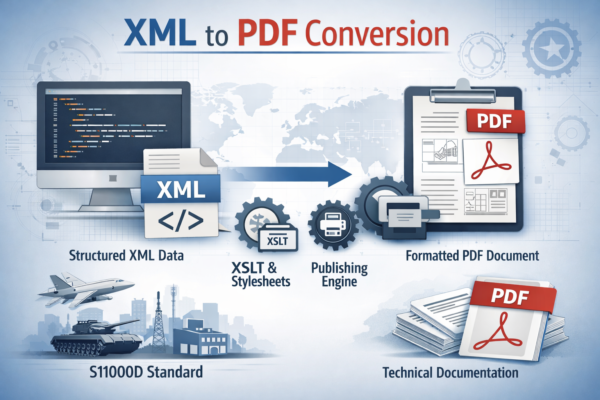
The process of xml to pdf conversion involves transforming structured XML content into a formatted PDF using stylesheets and publishing engines. This transformation ensures that technical data becomes visually structured, accessible, and ready for distribution.
In industries following standards like S1000D Specification, XML plays a key role in managing large volumes of technical documentation.
Why XML to PDF is Important for Technical Documentation
Organizations dealing with complex documentation rely heavily on xml to pdf workflows due to several reasons:
1. Standardization and Consistency
XML ensures structured content, while PDF ensures consistent formatting across devices. The xml to pdf process guarantees that all documents follow the same layout and structure.
2. Multi-Channel Publishing
A single XML source can generate multiple outputs including web pages, mobile content, and PDFs. The xml to pdf approach allows businesses to reuse content efficiently without duplication.
3. Compliance with Industry Standards
Industries such as aerospace and defense require strict documentation standards. Using xml to pdf ensures compliance and traceability in documentation workflows.
4. Print-Ready Documentation
PDF files are universally accepted and ideal for printing manuals, reports, and guides. The xml to pdf process ensures high-quality output suitable for official use.
How XML to PDF Works
The xml to pdf conversion process is not just a simple file export. It involves multiple stages of structured publishing:
- Content Creation in XML
Authors create structured content using XML tags. - Validation of XML Data
The XML content is validated against schemas and rules to ensure accuracy. - Transformation Using Stylesheets
Technologies like XSLT and XSL-FO are used to transform XML into a formatted layout. - Rendering into PDF
A layout engine generates the final PDF document with proper formatting, pagination, and styling.
In advanced systems, the xml to pdf process includes publishing engines and layout engines working together to produce high-quality outputs.
Role of NavIETM® in XML to PDF Conversion
The NavIETM® XML Technical Documentation Tool is designed to streamline the entire lifecycle of technical documentation, including xml to pdf conversion.
Key Features:
- Structured Authoring Environment
Enables users to create standardized XML content efficiently. - Automated Publishing
Simplifies the xml to pdf workflow with automation tools. - Schema Validation
Ensures XML files meet required standards before conversion. - Multi-Format Output
Supports PDF, HTML, and other formats from a single XML source. - Collaboration Support
Allows teams to work together on large documentation projects.
The tool is built to handle complex technical data and convert it into high-quality outputs seamlessly.
Benefits of Using XML to PDF with NavIETM®
1. Improved Efficiency
Automation reduces manual effort in formatting and publishing, making the xml to pdf process faster.
2. Reduced Errors
Built-in validation ensures that XML data is accurate before conversion.
3. Scalability
Handle thousands of documents efficiently using a centralized system.
4. Content Reusability
Reuse XML data across multiple documents without rewriting content.
5. Cost Savings
Minimize production costs by automating repetitive tasks in the xml to pdf workflow.
Use Cases of XML to PDF Conversion
Technical Manuals
Industries use xml to pdf to create detailed manuals for products and systems.
Aerospace and Defense Documentation
Structured XML data is converted into PDFs for compliance and operational use.
Software Documentation
Developers generate user guides and API documentation using xml to pdf tools.
Training Materials
Organizations create structured learning materials and convert them into PDFs for distribution.
Best Practices for XML to PDF Conversion
To get the best results from xml to pdf, follow these best practices:
- Use well-structured XML schemas
- Maintain consistency in tagging
- Validate XML before conversion
- Use optimized stylesheets for formatting
- Automate publishing workflows
Using a professional tool like NavIETM® XML Technical Documentation Tool ensures that these practices are implemented effectively.
Future of XML to PDF Publishing
The future of xml to pdf conversion is driven by automation, AI integration, and cloud-based publishing platforms. Organizations are moving towards smarter documentation systems that can generate outputs instantly while maintaining accuracy and compliance.
With advancements in structured authoring and publishing technologies, the xml to pdf process will become even more efficient and scalable.
FAQs
1. What is XML to PDF conversion?
XML to PDF conversion is the process of transforming structured XML data into a formatted PDF document using stylesheets and publishing engines.
2. Why is XML to PDF important?
The xml to pdf process ensures consistent formatting, easy readability, and compliance with documentation standards.
3. Which tool is best for XML to PDF conversion?
The NavIETM® XML Technical Documentation Tool is one of the best tools for efficient and automated xml to pdf conversion.
4. How does XML to PDF work?
The xml to pdf process involves XML creation, validation, transformation using stylesheets, and rendering into a PDF format.
5. Can XML be converted to multiple formats?
Yes, XML can be converted into PDF, HTML, and other formats using the same source content.
6. What industries use XML to PDF?
Industries like aerospace, defense, manufacturing, and software development widely use xml to pdf workflows.
7. Is XML to PDF conversion automated?
Yes, modern tools like NavIETM® automate the xml to pdf process, reducing manual effort and errors.
8. What are the benefits of XML to PDF?
Benefits include consistency, scalability, reusability, and high-quality output.